The Best Website Booking Flow for Nervous First-Time Divers
<b>TL;DR:</b> The best booking flow for anxious beginners reduces fear at every touchpoint. Use clear language, transparent pricing, warm automated emails, digital waivers, and mobile-friendly design. Each element should build trust and transform hesitation into excitement before students ever step into the water.
<b>Key Takeaways</b>
- Nervous beginners need social proof, clear pricing, and jargon-free course labels to build trust
- Digital waivers and medical forms completed at home reduce first-day stress dramatically
- Automated emails that answer safety questions before they're asked build confidence
- Matching beginners with patient instructors improves retention and word-of-mouth marketing
- Mobile-optimized booking interfaces lower drop-off rates among anxious phone users

Picture this. Someone is hovering over the "Book Now" button at 11 PM. They are Googling "is scuba diving scary" for the third time. Then, they close the tab.
Your booking process is the very first test dive into your business. Nervous first-timers aren't just buying a course. They're buying peace of mind. Anxiety usually stems from fear of the unknown, absolute dependency on life-support equipment, and lack of control. A clunky, confusing booking flow amplifies that fear. A welcoming one reduces it. The booking flow for nervous first-time divers must do more than collect payment. It must build confidence from the very first click.
Why do first-time divers feel nervous about booking?
A new diver faces a massive trust gap between clicking a button and showing up on day one.
According to PADI's 2024 consumer research, approximately 60% of non-divers cite fear of the unknown as their top barrier to trying scuba diving. People worry about drowning, equipment failure, claustrophobia, or simply looking foolish in a wetsuit.
When your website has unclear pricing, vague course descriptions, or complicated PDF forms, it triggers cart abandonment.
> "First-time divers are buying an emotional experience, not just a service. If your booking page doesn't address their fears, they'll find one that does."
> — Sarah Mitchell, Dive Center Operations Consultant, Dive Business Quarterly
It's totally normal for new divers to feel this way. The goal of your website is to validate those feelings and offer a safety net.
The three fears that stop people from clicking 'Book Now'
<b>Fear of the unknown:</b> What will actually happen? Who will be there? What if I fail? You can solve this with transparent schedules and friendly staff bios.
<b>Fear of hidden costs:</b> Will gear cost extra? Are there surprise marine park fees? Clear, all-inclusive pricing removes this anxiety.
<b>Fear of commitment:</b> What if I need to cancel? What if I'm not physically ready? Flexible cancellation policies and clear medical guidelines help them commit.
What should a beginner-friendly booking flow look like?
The journey should feel like a guided tour, not a rigid application process.
A beginner-friendly flow removes friction. According to the Phocuswright Travel Innovation Report (2025), mobile bookings for adventure travel experiences grew by 43% from 2023 to 2025. Users expect seamless, app-like interfaces. Here's how to map that journey.
| Stage | What Nervous Divers Need | Best Practice |
| :— | :— | :— |
| <b>Course Selection</b> | Clear, jargon-free options | Use labels like "First-Timer Experience" instead of "Open Water Level 1" |
| <b>Information Gathering</b> | Reassurance about safety | State instructor ratios, provided gear, and certification guarantees |
| <b>Booking & Registration</b> | Minimal friction | Offer digital forms completed at home, not on the dock |
| <b>Confirmation</b> | Immediate comfort | Send an automated email with packing lists and contact info |
Stage one: Course selection that reduces choice paralysis
Use "beginner" or "never dived before" filters prominently. Don't overwhelm visitors with ten different course options. Offer two or three clear pathways. Include visual icons like "Best for Nervous Divers" and show real student photos instead of stock imagery.
Stage two: Information that builds trust, not confusion
Clearly list what's included. Mention the rental gear, the instructor ratio, and the certification card. Address common questions inline. If they wonder about equalizing their ears, link to a short explainer video. Display instructor bios with photos highlighting those who are great with anxious beginners.
Stage three: Paperless booking that feels easy
Keep paperwork out of the dive center lobby. Use mobile-responsive digital waivers and medical forms completed before arrival. Add progress indicators like "Step 2 of 3" to reduce overwhelm.
Stage four: Confirmation that comforts
Send an automated email immediately. Use a warm, personal tone. Tell them what to bring, what not to worry about, and provide a map to your shop. Follow up 48 hours before the dive with an encouraging message.

How does Dive Admin make booking easier for nervous beginners?
Dive Admin takes the guesswork out of the booking process so you can focus on teaching.
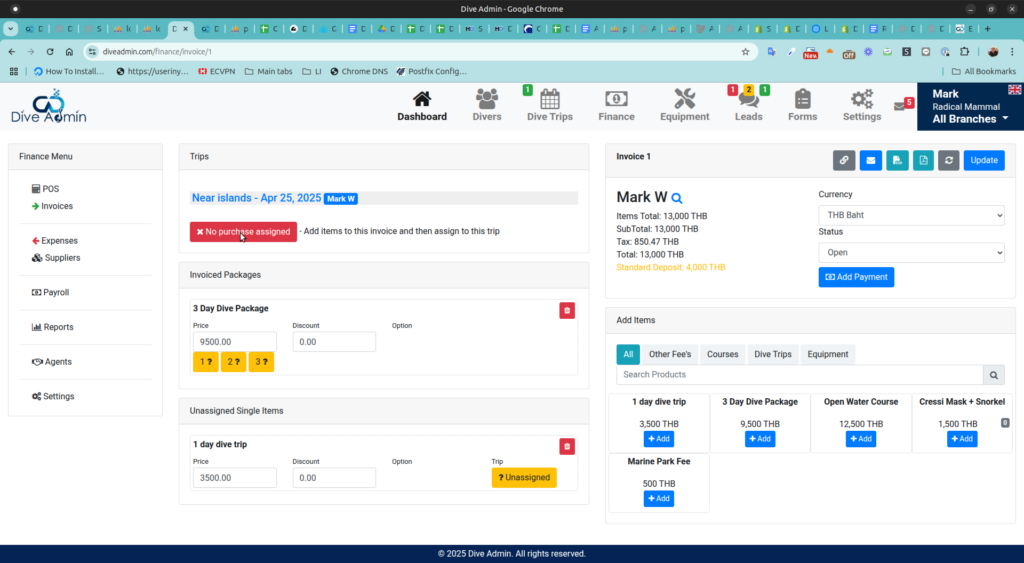
Software plays a massive role in creating a welcoming environment. Dive Admin offers features specifically designed to help dive centers handle beginners.
- <b>Automated Communication:</b> Timely, encouraging reminders reduce no-shows and calm nerves.
- <b>Paperless Onboarding:</b> Students handle waivers and medical forms digitally from their couch.
- <b>Smart Staff Allocation:</b> The system automatically matches nervous beginners with patient, highly experienced instructors.
- <b>Mobile-Friendly Interface:</b> Seamless booking works perfectly on any smartphone.
- <b>Real-Time Availability:</b> No ghost bookings or confusing schedules. Students see exactly what's open.
What mistakes do dive centers make that scare off first-timers?
Treating a first-time diver like a seasoned pro is a common mistake.
Many dive centers accidentally build barriers right on their homepage. Each mistake carries a heavy trust cost.
- <b>Too much jargon:</b> Labeling a course "SSI vs. PADI Level 1 Confined Water Session" is highly confusing for a novice.
- <b>Hidden fees:</b> Springing a surprise gear rental charge at checkout feels deceptive.
- <b>No faces:</b> Relying on stock photos of coral instead of showing real instructors makes the business feel impersonal.
- <b>Complicated forms:</b> Forcing users to download ten-page PDFs that need printing and scanning will make them abandon the booking.
- <b>Radio silence:</b> Failing to send a confirmation or follow-up leaves the student wondering if they actually booked a spot.
- <b>Mobile disasters:</b> A booking flow that breaks on a phone screen will lose modern customers immediately.
How can you use social proof to calm nervous divers?
Let your past students do the talking.
According to BrightLocal's 2024 research, 93% of consumers read online reviews before booking a travel experience. Social proof acts as a security blanket for anxious buyers.
Display your Google or TripAdvisor star ratings right next to the checkout button. Feature short video testimonials from recent first-timers saying things like, "I was terrified, but my instructor made it amazing." Highlight these specific success stories in your course descriptions. Seeing real people overcome the exact same fears gives new divers the courage to proceed.
Should you offer a pre-booking consultation for anxious students?
High-anxiety users sometimes just need to hear a human voice.
While you don't need to call every single customer, offering a phone or video call option can drastically increase your conversion rate. Place a live chat widget on the booking page to answer real-time questions. Add a simple "Talk to an Instructor" button for those needing extra reassurance. Dive Admin can easily automate the scheduling for these quick consultations, keeping your calendar organized without extra admin work.
What should your confirmation email include to reduce first-day anxiety?
Your email should feel like a friend preparing you for a fun day out.
Don't send a dry, legal-sounding receipt. Use the confirmation email to set the tone for the entire course.
- <b>Warm welcome:</b> Start with "We're so excited to meet you!"
- <b>What to bring:</b> Keep it simple. Swimsuit, towel, and reef-safe sunscreen.
- <b>What NOT to worry about:</b> Explicitly state that you provide all the heavy gear and that zero experience is needed.
- <b>Instructor introduction:</b> Include their name, a smiling photo, and a fun fact.
- <b>Clear directions:</b> Provide parking info and a map link.
- <b>Contact info:</b> Make it easy for them to reach out if they panic the night before.
- <b>Cancellation policy:</b> A flexible rescheduling policy reassures them they're not trapped.
How do you handle medical concerns in the booking flow?
Handle medical disclosure transparently but without sounding the alarm.
The standard RSTC medical questionnaire can sound scary to a beginner. The trick is to send digital medical questionnaires after the booking is secure, rather than using them as a massive roadblock upfront.
Use clear, calming language. Tell them, "Most people are cleared instantly. This is just a standard safety check." If they do need physician clearance, explain the process simply so it doesn't feel like a rejection. Reassure them that the process is completely confidential. Dive Admin automates this medical form routing and follow-up, keeping private data secure while keeping the customer informed.
Ready to create a booking experience that turns anxiety into excitement? A beginner-friendly flow is all about trust, clarity, and ease. Small design choices have a huge emotional impact on your customers. Once nervous divers have a great experience, they become your loudest word-of-mouth marketers. Dive Admin's automated communication, paperless onboarding, and smart scheduling give you the tools to welcome beginners with absolute confidence.
FAQ
What if I'm too scared to go through with it after I book?
It's completely normal to feel cold feet before your first dive. Most dive centers offer flexible cancellation or rescheduling policies for this exact reason. Instructors are trained to handle anxiety and will never force you to do anything you're uncomfortable with. You can always reach out to the shop before your session to talk through your worries.
Do I need to know how to swim well to book a scuba diving course?
You need basic water comfort, but you don't need to be an Olympic swimmer. Courses always start in shallow water or a swimming pool where you can stand up. Instructors assess your comfort level at a very slow pace, ensuring you feel safe before going any deeper.
What happens if I fail the medical form for scuba diving?
Answering "yes" to a question on the medical questionnaire doesn't mean you're banned from diving. It simply means you need a quick clearance from a physician to ensure your safety. Disqualification is actually quite rare, and the entire review process is kept strictly confidential.
Can I book a private scuba lesson if I'm really nervous?
Absolutely. Many dive centers offer one-on-one sessions for beginners who want dedicated attention. You can usually request a private instructor during the booking process for an additional fee, giving you total control over the pace of the class.
How do I know my dive center is safe and certified?
Look for official accreditation from recognized agencies like PADI or SSI on their website. You should also check for recent, positive online reviews mentioning safety and patient instructors. Software like Dive Admin helps dive centers maintain proper insurance compliance and instructor credentials, ensuring a safe environment behind the scenes.